
Online booking system

Online patient booking, without giving up control of your diary.

Patients can book anytime, from anywhere, including after hours. Your practice decides exactly when, where and how each practitioner can be booked.

How PractoSync online patient booking works

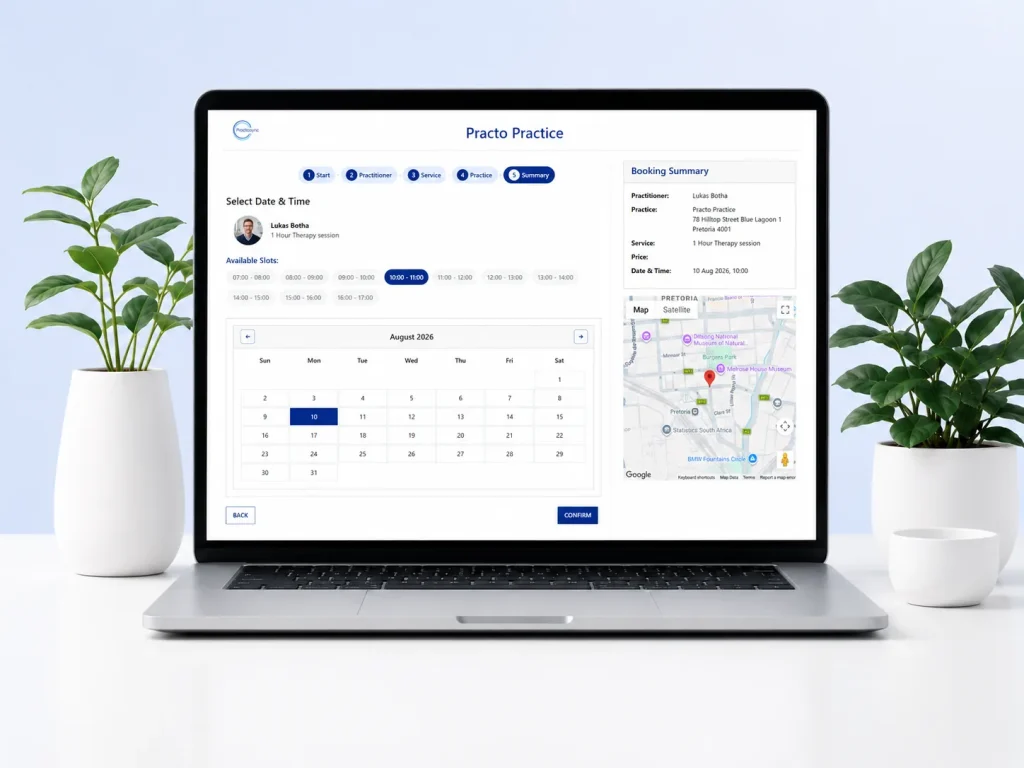
PractoSync online booking screen on a laptop - patient selecting a practitioner, date and time slot with the practice location shown on a map

1. Patients only see where their practitioner is available

Patients can book an appointment at any location where their chosen practitioner is working, making it easier to find a time and place that suits them.

2. You decide when and where patients can book

Each practitioner’s working days, hours, breaks and locations are fully configurable by the practice. Online booking follows the way your practice actually operates.

3. Live availability. No double bookings.

Online bookings use the same live diary as the practice, so once a slot is taken, it is no longer available to somebody else.

New patients? The online intake form is built into the booking: new patients can complete their details as part of making the appointment, before they arrive.

Why practices choose PractoSync online booking

For your patients

  • Book anytime, from anywhere: no phoning the practice or waiting for reception to respond, even after hours.
  • Book at any location where their practitioner works: whichever branch, room or practice suits them best.
  • Real-time availability: patients only see appointment times that are genuinely available.
  • A better booking experience: compare available times, practitioners and locations and book in a few steps.
  • No need to call back later: patients complete the booking while they are ready, so fewer bookings are lost.

For your practice

  • You stay fully in control: configure each practitioner’s availability by day, time and location.
  • No double bookings: online availability is linked to the live appointment diary.
  • Works around each schedule: working hours, different days, breaks and blocked-out periods.
  • Less reception admin: fewer phone calls, WhatsApps and emails just to find a suitable time.
  • Location flexibility without diary complexity: availability always shows in the correct location.
  • Straight into the practice diary: no separate online-booking calendar to reconcile manually.
  • More bookings outside office hours: evenings and weekends no longer wait for reception to reopen.
Let patients book themselves without giving up control of your diary.

Fewer phone calls. More bookings, including after hours.

Online booking FAQs

Can patients book appointments online with my practice?

Yes. Patients book themselves through a link on your website, from a phone or a computer, at any hour including after you have closed. They only ever see times that are genuinely free, and the booking goes straight into the practice’s diary.

Do patients need an app or an account to book?

No. Online booking runs in a normal web browser, so there is nothing for a patient to download and no account to create first. They pick a service or a practitioner, choose a time and confirm.

Will online bookings appear in the same diary as bookings made by reception?

Yes. There is only one diary. An online booking lands in the same practice diary your staff already work from, so there is no second calendar to check or reconcile at the end of the day.

What stops two patients booking the same time slot?

Online availability is read live from the diary, so once a time is taken it stops being offered. While a patient is completing a booking the slot is held for them for a short period, which prevents two people claiming the same time from separate devices.

Can patients choose which practitioner they see?

Yes. A patient can start by choosing a practitioner and then see that person’s available times, or start from the service they need and see who offers it. Both routes end at the same confirmed booking.

Can patients book at a particular location or branch?

Yes. Availability is set per practitioner per location, so a patient only sees times at a place where that practitioner actually works. The location travels with the appointment through to the invoice.

Can I choose which services patients can book online?

Yes. You decide which services are offered online and which stay bookable by the practice only. Each service carries its own duration, so the slot a patient books is the right length for the appointment they have chosen.

How do I stop patients booking when I am not available?

Working days, hours, breaks and blocked-out periods are configured per practitioner, and online booking follows them exactly. Time you have marked as unavailable is never offered to a patient.

Can new patients give their details when they book?

Yes. The intake form is built into the booking, so a new patient completes their details as part of making the appointment. Existing patients simply book, because their record is already on file.

Can I switch online booking off for some practitioners?

Yes. Online booking is configured per practitioner, so you can open it for the people who want it and leave the rest bookable by the practice only. It can be changed at any time in Practice Settings.

What happens after a patient books online?

The appointment appears in the diary immediately and a confirmation goes to the patient. From that appointment your team can carry straight on into notes and invoicing without re-typing anything.

Do patients get a confirmation and a reminder?

Yes. A confirmation goes out when the booking is made, and reminders follow by SMS or email before the appointment. Each appointment keeps its own reminder history, so your staff can see exactly what was sent.