Appointment scheduling

Medical appointment scheduling for your whole practice.

One diary for every practitioner, room and location.

See the whole practice in a single view, book without double-booking, and carry every appointment through from arrival to invoice.

How PractoSync appointment scheduling works

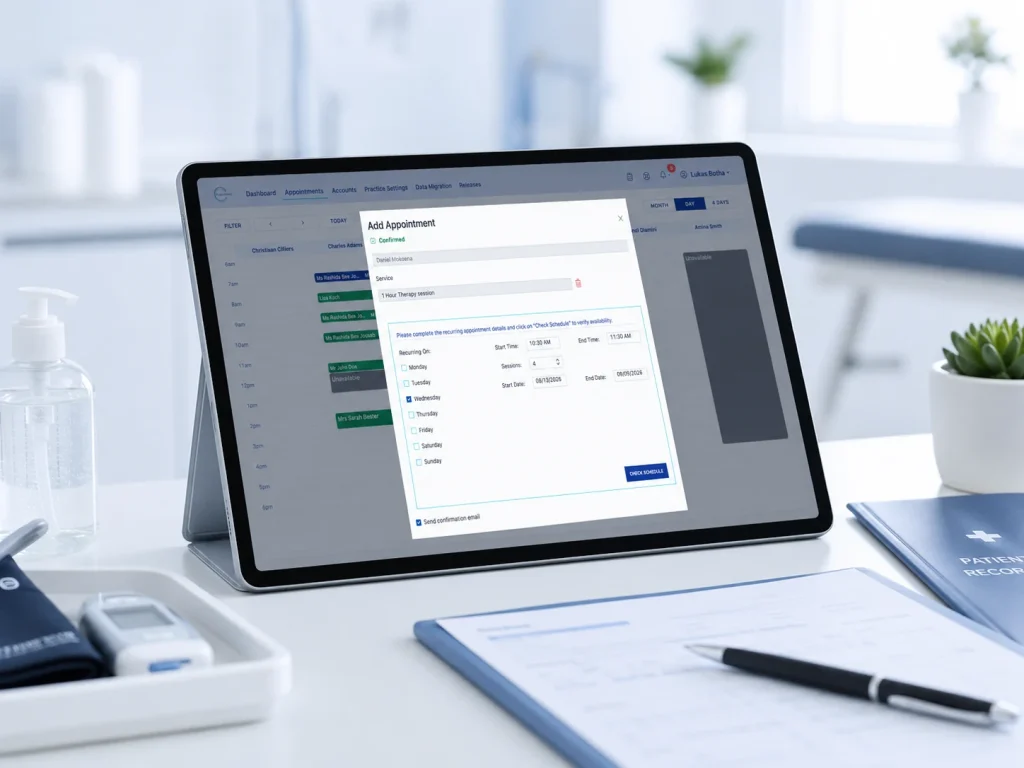
The PractoSync Add Appointment window setting up a recurring weekly appointment, with a Check Schedule button to verify availability

1. The whole practice in one view

Day, four-day and month views, with every practitioner side by side in their own column. Filter down to the people and the statuses you actually want to look at.

2. Book without double-booking

When a time is already taken, PractoSync says so and offers the next available start times, rather than leaving reception to hunt for one.

3. Deliberate overlaps stay possible

Sometimes you genuinely need two things at once. PractoSync warns you and lets you continue, so the diary reflects how the practice really runs instead of blocking you.

4. Recurring appointments in one step

Choose the days and the date range and PractoSync creates the whole series, listing any dates that clash so you can deal with those individually.

5. Availability the practice controls

Working days, hours, breaks, locations and blocked-out periods are set per practitioner, and unavailable time is visible on the diary rather than hidden.

6. See the state of every appointment

Each booking carries its own colour and icons: recurring, intake form sent, notes completed, invoiced, invoice emailed and paid, plus whether the patient is medical aid, IOD or private.

New patients? The intake form can be sent by email or SMS at the moment you make the booking, so their details arrive before they do.

Why practices choose PractoSync appointment scheduling

For your practitioners

  • Your day at a glance: your own column, your own appointments, without scrolling past everybody else’s.
  • The whole appointment in one place: patient, service, location, notes and billing state, opened from the booking itself.
  • Straight from finished to invoiced: complete an appointment, write the notes and raise the invoice without leaving the workflow.
  • Recurring patients handled properly: move a single appointment without disturbing the rest of the series.
  • Works on a tablet: the diary is usable at the desk, in the room or between patients.

For your front desk

  • Change status in one click: work down the day’s list and mark patients as they arrive, without opening each appointment.
  • Confirmations and reminders: send a confirmation when the booking is made, and remind patients by SMS or email before the day.
  • See what was actually sent: every appointment keeps its own reminder history, so nobody has to guess.
  • Fewer clashes to untangle: conflicts are caught while you are booking, not discovered on the day.
  • Several practices, one diary: staff working across practices or locations see everything in one place.
  • Nothing falls between systems: online bookings land in the same diary, so there is no second calendar to reconcile.
One diary for every practitioner, room and location.

Spend less of the day rebuilding the schedule and more of it seeing patients.

Appointment FAQs

Can patients book appointments online with PractoSync?

Yes. Patients book themselves through a link on your website, from a phone or a computer, at any hour. They only see times that are genuinely free, because online booking reads the same live diary the practice works from, and the booking lands straight in it.

Does PractoSync send automatic appointment reminders?

Yes. Reminders go out automatically by SMS and email ahead of the appointment, and a confirmation can be sent the moment the booking is made. Each appointment keeps its own reminder history, so you can see exactly what was sent and when.

Can two practitioners share the same diary?

Yes. Every practitioner gets their own column in the same diary, so the whole practice works from one calendar rather than separate ones. You can look at a single practitioner, four days side by side, or the whole month.

Does PractoSync stop double bookings?

Yes. If you choose a time that is already taken, PractoSync tells you and offers the next available start times instead of letting the clash through. When you genuinely need two appointments at once it warns you and still lets you continue, so the diary reflects how the practice actually runs.

Can I set different working hours and availability for each practitioner?

Yes. Working days, hours, breaks and blocked-out periods are configured per practitioner, and per location where they work at more than one. Online booking follows those settings, so patients are never offered a time the practitioner is not actually available.

Can I reschedule one appointment without changing the whole recurring series?

Yes. Moving a single appointment detaches just that one from the series and leaves the remaining dates untouched. The rest of the recurring bookings stay exactly where they were.

Can I book a recurring appointment?

Yes. Choose the days of the week and a date range, and PractoSync creates the whole series in one step. Any dates in that range that clash with something else are listed separately so you can deal with them individually.

Can patients be booked at more than one location?

Yes. Every appointment carries the location it happens at, and each practitioner’s availability is set per location. A patient booking online only sees times at a location where that practitioner actually works.

How do I see whether an appointment has been invoiced or paid?

Each appointment in the diary carries small icons showing its state: intake form sent, notes completed, invoiced, invoice emailed and paid. You can read the status of the whole day without opening a single appointment, and the billing side stays attached to the same record.

What happens when a patient cancels?

The slot is freed so it can be booked by someone else, and no reminder is sent for it. The appointment stays on the patient’s record rather than disappearing, so a gap in a course of treatment is still visible later.

Can I write clinical notes straight from the appointment?

Yes. Completing an appointment takes you into the session notes and on to the invoice without searching for the patient again. The note, the appointment and the invoice all stay attached to the same patient record.