Billing & Claims

Medical billing and claims software for your practice.

Turn billing, claims and payments into one connected workflow.

Create medical-aid-ready invoices, submit Medical Aid and IOD claims, and let payments allocate automatically.

How billing and claims work in PractoSync

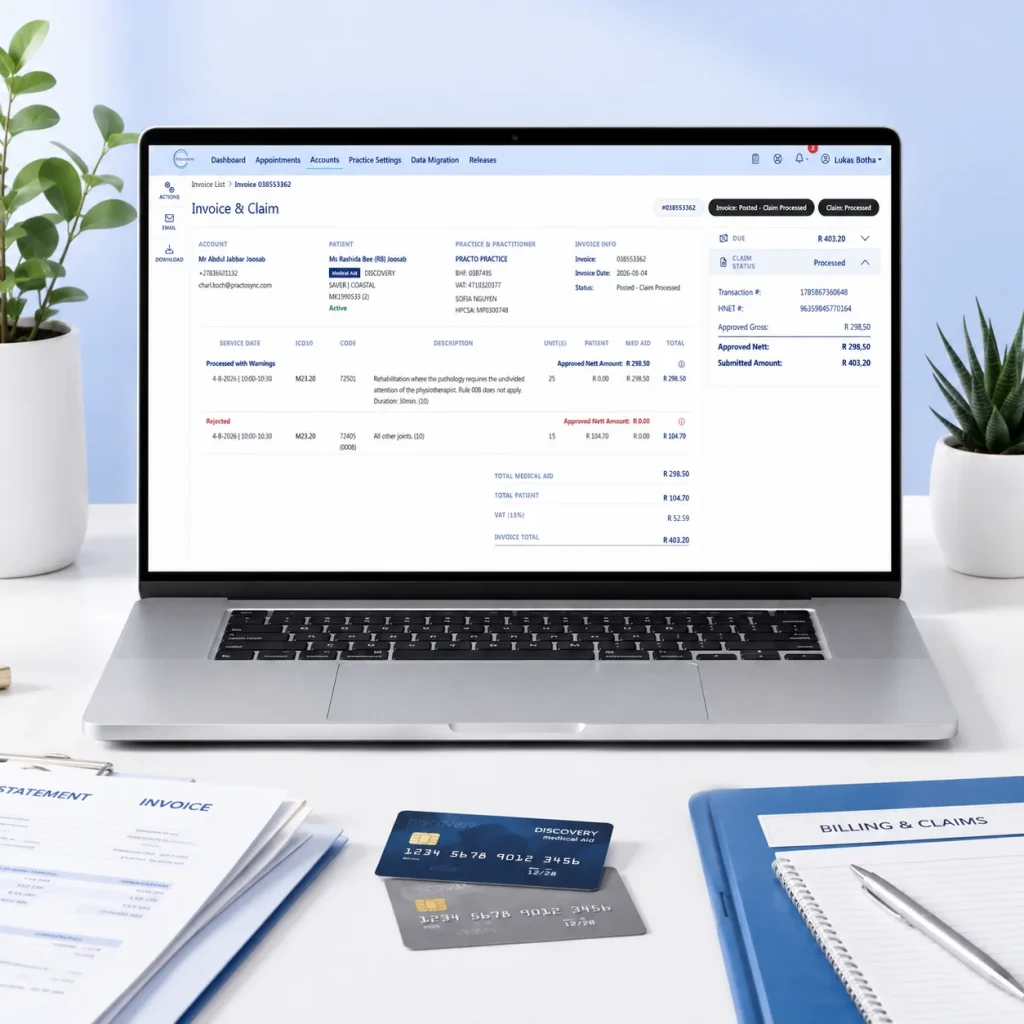
PractoSync invoice and claim screen on a laptop showing claim status with medical aid and patient portions, next to medical aid cards and a Billing and Claims folder

1. Submit claims without leaving the invoice

Create medical-aid-ready invoices and submit Medical Aid and IOD claims directly from PractoSync, keeping billing and claiming in one connected workflow.

2. Let payments allocate themselves

Medical aid ERA payments are automatically matched and allocated against the relevant invoices, reducing reconciliation and manual payment allocation.

3. Take card payments without recapturing anything

Send the amount directly from PractoSync to your integrated Yoco terminal. Once payment succeeds, PractoSync records and allocates it automatically. No entering the amount twice and no allocating the payment afterwards.

Tap. Paid. Allocated. Select the amount in PractoSync and let the patient tap: no retyping the amount on the terminal and no finding the invoice afterwards to allocate the payment. One connected transaction, recorded and allocated automatically.

Why practices choose PractoSync billing

For your patients

  • Tap and pay in seconds: the amount goes straight from PractoSync to the card terminal, with nothing retyped at the counter.
  • Secure payment links: settle outstanding amounts remotely through integrated payment partners, with successful payments recorded against the account.
  • Professional invoices, receipts and statements: consistent documents with the relevant account, practitioner, medical aid, treatment and payment information.
  • Clear balances: statements separate the medical aid portion from the patient portion, so patients always know exactly what they owe and why.

For your practice

  • Medical-aid-ready invoicing: practitioner, patient, medical aid, tariff/NAPPI and ICD-10 information captured on the invoice, with the medical aid and patient portions distinguished from the start.
  • Medical Aid & IOD claim switching: submit claims electronically from the same platform where the invoice was created, with no separate claiming application and no re-entering invoice information.
  • Claim responses where you need them: see whether claims and individual items were processed, rejected or returned with warnings, so staff deal with exceptions instead of checking every claim.
  • ERA reconciliation and automatic allocation: medical aid payments are received electronically and allocated against the correct invoices, so the payment is connected back to what was actually billed.
  • Integrated Yoco payments: select the amount, let the patient tap, done. The payment is recorded and allocated automatically.
  • Patient and medical aid balances stay separate: know exactly what is still owed by the patient and what is outstanding from the medical aid.
  • See what is actually outstanding: open invoices and 30/60/90/120+ day ageing make it easy to focus collection efforts where they are needed.
  • Financial reporting without spreadsheets: track invoicing, payments, allocations, sales and outstanding balances directly from the practice workflow.

Let payments allocate themselves so your team doesn't have to.

From invoice to payment, without the admin in between.

Billing and claims FAQs

Can PractoSync submit medical aid claims?

Yes. Claims are prepared from the same record as the appointment and the clinical note, then submitted electronically to the medical aid. Because the diagnosis and the service codes are already on the record, the claim is not assembled from scratch.

Do I have to type in tariff and ICD-10 codes myself?

No. Tariff codes and ICD-10 codes are looked up as you work rather than kept in a spreadsheet somewhere. The diagnosis captured with the clinical note carries through to the claim.

Can I invoice straight from an appointment?

Yes. Completing an appointment carries on into the invoice without searching for the patient again. The service booked in the diary defines the line on the invoice, so the two cannot drift apart.

Can patients pay by card in the practice?

Yes. Card payments can be taken through a connected Yoco card machine, and the payment is recorded against the account rather than reconciled separately afterwards.

How are payments matched to invoices?

Receipts are allocated against the outstanding invoices on the account, so the balance reflects what has actually been paid. Where an allocation is wrong it can be reversed rather than worked around.

Can I correct a mistake on an invoice that has been issued?

Yes. Issued invoices are corrected through credit notes and receipt reversals rather than being quietly edited. Every change writes an entry to the record, so the account history stays auditable.

Can I write off an amount that will not be paid?

Yes. An outstanding balance can be written off against the account, and the write-off is recorded with a reason. It is a deliberate, logged action rather than an adjustment that disappears.

Can we send patient statements?

Yes. Statements can be produced for an account and emailed, individually or in a batch across the practice. Patients see what they owe without reception assembling it by hand.

Does billing work across more than one practice or location?

Yes. Accounts are scoped to the practice they belong to, and staff working across several practices see the right financial information for each. The location on the appointment carries through to the invoice.

Who in the practice can see financial information?

Access follows the role you give each person, enforced on the server rather than only hidden in the interface. Administrative staff can work on accounts without needing access to the clinical record.